For Salesforce admins, architects and security reviewers who run sf-audit, or who have to act on a report someone else ran. This covers the redesigned report in 1.25 and what changed in the checks since 1.17.
TL;DR
- Page one is a plan, not a list. The report opens on the grade with its reason, then ranked actions in three waves. Each action shows the findings it closes and the attack paths it breaks.
- Attack paths take one line each: the severity, the name and the fix that breaks it. Steps and the diagram open on demand.
- A scorecard covers ten security domains, worst first. A domain with checks the audit could not run reads "partly unseen", never "clear".
- Every result sits in one table that regroups by severity, domain, attack chain or framework, with a stable link per finding for your tickets.
- The checks are more accurate than they were at 1.17. Coverage on a live org rose from about 58% to 96 to 97%, and several checks that passed everywhere now find what they look for.
What You'll Learn
- What each part of the new report is for, and which part to send to whom
- How the fix-first plan is built from attack chains rather than listed by severity
- Why a SOQL filter on a value Salesforce never writes passes silently, and which checks it hid
- Why your grade may move when you upgrade, and in which direction
The Problem
Until 1.25 the technical report was a dark dashboard followed by every result in check order: 123 rows for a typical org, passed and failed together. The data was all there, but the reader had to do the triage. They needed to find the four critical findings, work out which of them shared a cause, and decide what to do on Monday.
The executive report already answered that question, as a slide deck with an action plan. The technical report sat beside it and told a different story in a different look. An admin holding both had no single place to start.
There was a second problem underneath, and it was worse. A report that is easy to read is only useful if what it says is true. Between 1.18 and 1.24, running the audit against real orgs showed checks that passed because their queries could never return a row.
Common questions this article answers:
- What should I look at first in an sf-audit report?
- How does the report decide which fix comes first?
- Can a Salesforce security check pass because it is broken?
- Will my grade change after I upgrade?
Quick Answer
Update the plugin and run the audit as before. The HTML report is the default output:
sf plugins update
sf audit security --target-org myOrg
Read page one top to bottom: the grade and why, then the "Start now" actions. Send the attack paths to whoever owns the break point. Use the domain scorecard to assign owners, and the results table to raise tickets. A sample report from a fictional org shows every section.
The Report, Section by Section
1. The verdict and the fix-first plan
The top band gives the grade, the score and the reason in one line, for example "F: 6 CRITICAL (4 findings, 2 attack chains) (D allows none)". Next to it are the open-finding total and one severity bar. Evidence coverage sits under the grade. When checks could not run, the report names them and says why, so a high grade on thin evidence is visible as such.
Directly under it is the plan:
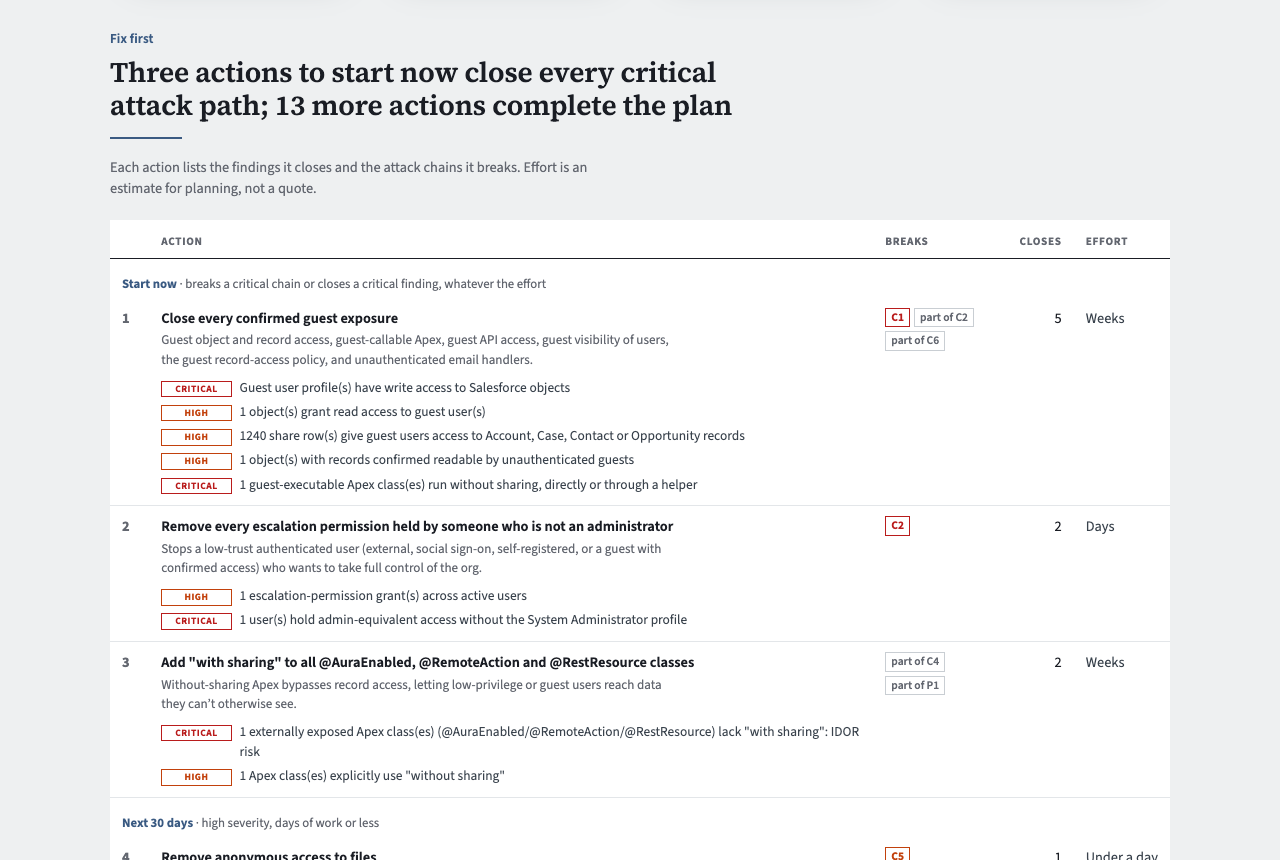
The plan is computed, not sorted by severity. Each named attack chain has a break point: the one fix that stops it in every case it fires. That break point becomes an action. Chains that share a break point share an action. Every other open critical or high finding becomes an action per check. Actions are then ranked by the risk they remove, and breaking a chain counts double.
That is why one action, "Close every confirmed guest exposure", can close five findings and break a critical chain at once. A severity-sorted list would scatter those five rows across the report, and nobody would see they share one fix.
Actions fall into three waves. "Start now" breaks a critical chain or closes a critical finding, whatever the effort. "Next 30 days" is high severity and days of work or less. "This quarter" holds the rest. The executive report uses the same plan and the same headline, so the technical and executive readers see the same answer.
2. Attack paths, one line each
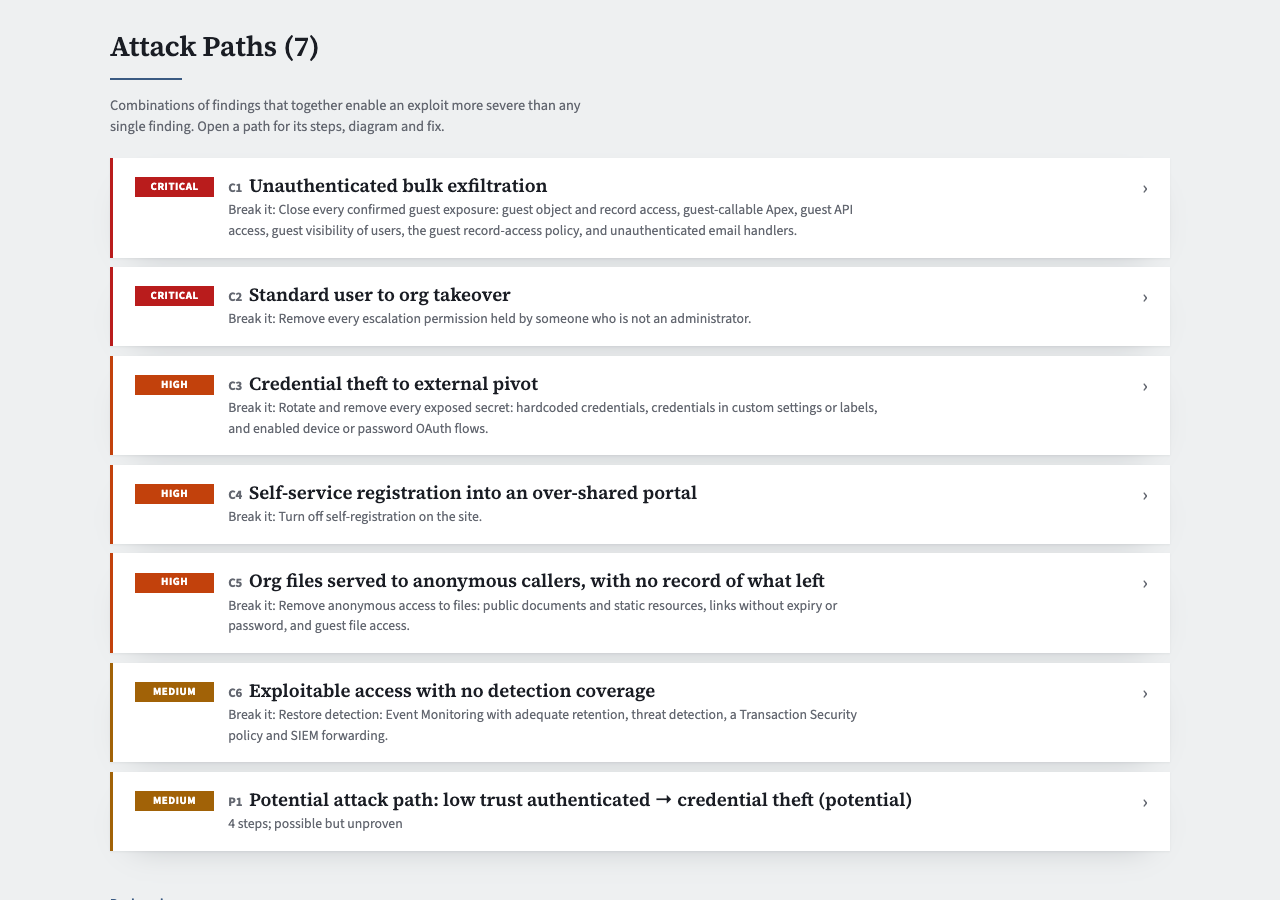
An attack path is a set of findings that together allow something worse than any one of them. The classic example is a guest user who can call Apex that runs without sharing on an object holding customer records. Each path collapses to its severity, its label (C1, C2, the same labels as the executive report), its name and "Break it:". Open a path to see its steps in the order an attack would run, mapped to MITRE ATT&CK tactics, plus the diagram and the full fix. The threat modelling post explains how chains and break points are derived.
Potential paths (P1 and onward) are listed apart, because no single break point is proven for them, and they never count towards the grade.
3. A scorecard by domain
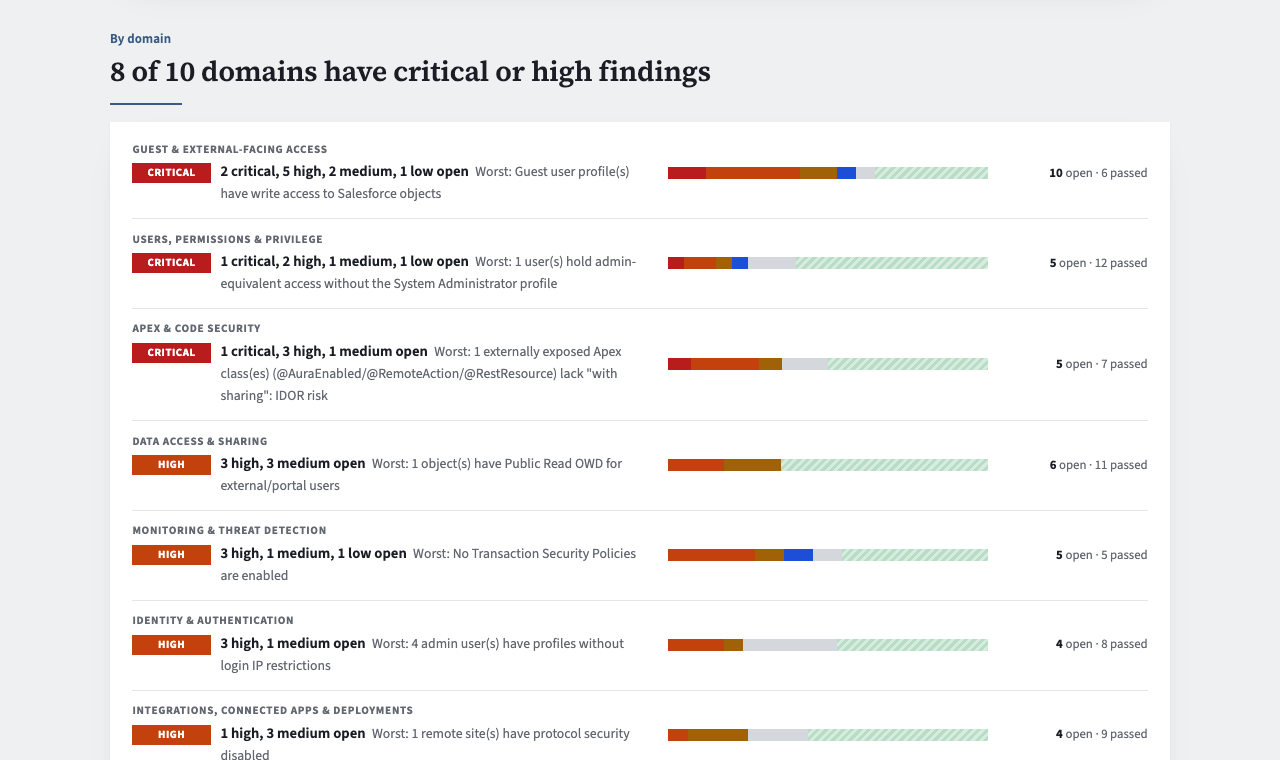
The 109 checks belong to ten domains: guest and external access, users and privilege, Apex, data sharing, monitoring, identity, integrations, org health, secrets, and AI agents. Each domain gets one row with a one-line claim, its worst finding and a bar of open against passed. Rows are sorted worst first.
This is the section for assigning work. The Apex row goes to the development lead, identity to whoever owns SSO, and monitoring to the team that would have to notice an attack. Under each row, the domain's findings are listed by severity with passed checks folded away.
A domain where some checks could not run is marked "partly unseen". An empty domain is never presented as assurance, because "no findings" and "not looked at" are different statements.
4. Every result, in one table
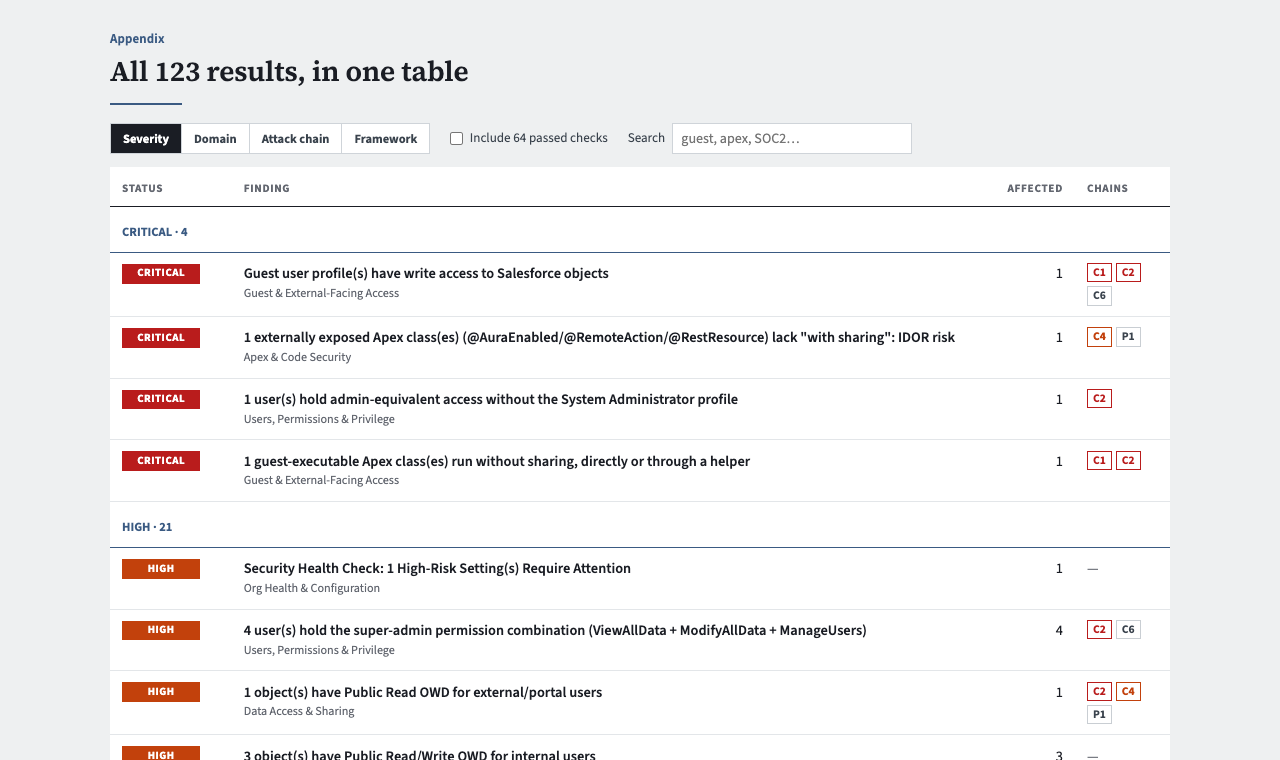
The appendix holds all results in one table. Group by severity for triage, by domain for owners, by attack chain to see what a fix will break, or by framework when an auditor asks for SOC 2 or HIPAA evidence. Search filters as you type, and passed checks stay hidden until you ask for them.
Each finding is drawn once, in its domain section, with a stable link (#f-<id>) you can paste into a ticket. The plan, the attack paths and the table all link to it rather than repeating it.
The whole report is now on white, in the executive report's palette. It prints, and severity is shown by label as well as colour.
Since 1.17: The Checks Got More Honest
A better layout makes wrong answers easier to believe, so most of the work between 1.18 and 1.24 went into the checks themselves. All of it came from running the audit against a Developer Edition org and two sandboxes, not from reading documentation.
Filters on values Salesforce never writes
Salesforce accepts a SOQL filter on a picklist value that does not exist and returns no rows. It raises no error and no warning. For a security check that looks for bad things, zero rows reads as a pass. In 1.24, several checks turned out to have this bug:
| Check | Filtered on | What Salesforce actually writes |
|---|---|---|
| Guest sharing rules | RowCause = 'SharingRule' |
Rule, and GuestRule for guest user sharing rules |
| SSO enforcement | LoginType = 'Username-Password' |
LoginSubType: UI Username-Password, OAuth Username-Password |
| Sharing to All Internal Users | Group.Type = 'AllInternal' |
Organization |
| MFA registration | TwoFactorInfo.Type |
TOTP only; other methods are in TwoFactorMethodsInfo |
Two more checks had the Id version of the same bug. They filtered SetupEntityAccess.ParentId and ObjectPermissions.ParentId on guest profile Ids. Those fields hold permission set Ids, so in a real org guest-executable Apex and guest object access could never be found.
If you maintain your own SOQL-based org checks, the same trap applies to you. sf-audit now guards against it with a schema snapshot that keeps picklist values, and a test that fails any query filtering on a value the picklist does not have.
Other accuracy changes worth knowing
- About 40 queries were rejected by the org and reported as "insufficient permissions" (1.18). They now run, and a rejected query quotes Salesforce's error. This is where coverage went from about 58% to 96 to 97%.
- Zero is not a pass. "0 users have Modify All Data" in an org with an active System Administrator means the audit user could not see the assignments. It is now inconclusive, with advice on what to re-run as (1.19).
- Guest exposure is graded against secure guest record access, which has been enforced since Winter '21. A public external OWD alone no longer makes an object CRITICAL. The check now asks
UserRecordAccesswhether a guest can actually read a sample of records (1.24). - Apex follows the API 67.0 defaults. From Summer '26 a class at API 67.0 or later with no sharing keyword runs with sharing, and its queries run in user mode. Those classes are no longer reported as missing a keyword or CRUD/FLS checks (1.24).
- Findings carry STRIDE, LINDDUN and MITRE ATT&CK tags, and every named chain states its actor, goal and break point (1.20, 1.21).
Frequently Asked Questions
Q: Will my grade change when I upgrade from 1.17?
Probably, in either direction. Checks that could not find anything before now can, so orgs with guest sharing rules, credential logins or guest-callable Apex may see new findings and a lower grade. Overstated findings were corrected too: a public external OWD on its own, keyword-less Apex at API 67.0, and portal-only MFA gaps. Those can raise a grade. Every run is archived locally, so sf audit history and sf audit diff show which findings moved.
Q: Does sf-audit change anything in my org?
No. Every check uses SOQL, Tooling, REST GET and Metadata API reads. The audit performs no DML and no deployments. It runs as the authenticated sf user, and a ready-made read-only permission set ships with the plugin. sf audit preflight lists the permissions that user is missing before you run.
Q: Can I get the old dark report back?
No. The dark theme is gone, and the technical and executive reports now share one look. Your firm's own colours and fonts still apply to the executive report when you have set them.
Q: Which report do I send to a client or a CISO?
Send the executive report (--format executive) to the people who approve the work: it is a slide deck that prints one slide per A4 page. Send the technical report to the people who do the work. Both lead with the same plan, so the two audiences agree on what comes first.
Q: Can I see a report before running it on my own org?
Yes. The technical and executive samples were produced by the real checks against a synthetic org.
Key Takeaways
- Read the report top down: grade and reason, then "Start now". The rest is detail for the people doing the fixing.
- Fix break points, not rows. One action can close five findings and stop a critical chain.
- "Partly unseen" means not checked. Close the coverage gap with
sf audit preflightbefore you rely on a clean domain. - A SOQL filter on a picklist value that does not exist returns nothing, silently. Check your own scripts for it.
- Expect your grade to move after upgrading, and use
sf audit historyorsf audit diffto see why.
What's Next?
Run 1.25 against a sandbox and read only page one. If the three "Start now" actions are not the ones you would have picked, the reason is usually in the attack path they break. Open it and check the steps against your org.
Related reading:
- Threat modelling a Salesforce org with STRIDE, LINDDUN and MITRE ATT&CK
- Salesforce attack chain correlation: five new chains and the blind spot that hid them
- The Experience Cloud guest user checklist, verified
Resources & References
- sf-audit on GitHub: source, README and CHANGELOG
- @cclabsnz/sf-audit on npm
- sf-audit release notes, 1.18.0 through 1.25.0
- Sample technical report and sample executive report
- MITRE ATT&CK Enterprise matrix
Responses
Checking your session.
Loading responses.