TL;DR
- In March 2026 attackers mass-scanned public Experience Cloud sites and pulled records through the Aura endpoint as the guest user, with no login at all. Salesforce responded with a nine-step checklist.
- A checklist ticked from memory is a statement of intent. What matters is what the org is configured to do today, on every site, including the one a contractor built in 2021.
sf audit securityverifies the steps that decide whether records leave: guest object access, external org-wide defaults, secure guest record access, guest API access, self-registration and guest member visibility. It also checks guest-callable Apex, which the checklist does not mention.- A handful of items, including the site-level "Allow guest users to access public APIs" setting, are not read by the plugin. They are listed below as the part of the review a person still has to do.
What You'll Learn
- What each item on Salesforce's checklist protects against
- Which sf-audit check covers each item, and what a failure looks like in the report
- The items no audit tool reading the API will see for you
- How to make the review repeatable so a new site cannot quietly undo it
The Problem
The campaign itself is covered in the verified timeline of the 2025 to 2026 data theft campaigns. The short version: a modified build of Mandiant's AuraInspector probed /s/sfsites/aura on public sites, and wherever the guest user could read an object, the records came back to an anonymous caller. Salesforce was clear that this was configuration, not a platform flaw, which means there is no patch. The fix is the checklist.
The checklist is good. The trouble is how it gets used. An admin reads it, opens the guest profile of the site they know about, unchecks a box or two, and reports back that the org is covered. Three things go wrong with that:
- There is more than one site. Orgs collect Experience Cloud sites: a support portal, a partner site, an event registration page someone spun up for a conference. Each has its own guest user and its own profile.
- The exposure is a combination. A guest profile with Read on Case is harmless if the external org-wide default for Case is Private and no sharing rule opens it. The same profile with a Public Read external default exposes every case. No single settings page shows you both.
- It drifts. The org is fine in March. In August a new site goes live with a cloned profile, and nobody re-reads the checklist.
So the useful question is not "did we follow the checklist?" but "which of these items can I verify automatically, every time, and which ones need a person?"
Quick Answer
Install the plugin and run it against the org (it only reads; it never changes anything):
sf plugins install @cclabsnz/sf-audit
sf audit security --target-org prod
To run just the guest and Experience Cloud checks:
sf audit security --target-org prod --checks guest-user-access,guest-object-exposure,guest-record-access-policy,guest-api-access,guest-user-visibility,guest-site-options,guest-executable-apex,experience-cloud-site,guest-traffic-anomaly
Then work through the manual items in the table below. Every finding in the report links to the Setup page where you fix it.
The checklist, item by item
Salesforce's guidance, Protecting Your Data: Essential Actions to Secure Experience Cloud Guest User Access (7 March 2026, updated 11 March), lists nine actions plus ongoing monitoring. Here is how each one maps.
| Salesforce's item | Verified by | How |
|---|---|---|
| 1. Guest profile restricted to the minimum objects and fields | guest-user-access, guest-object-exposure |
Object permissions on every guest profile and permission set, and which of those objects the UI API can actually serve |
| 2. External org-wide defaults Private, "Secure guest user record access" on | guest-object-exposure, guest-record-access-policy |
External OWD per object the guest can read; whether the secure record access enforcement is active |
| 3. Disable public APIs: "API Enabled" on the guest profile | guest-api-access |
API Enabled and Bulk API Hard Delete on any active guest user |
| 3. Disable public APIs: "Allow guest users to access public APIs" in site settings | Manual | Not read by the plugin today |
| 4. Stop guests listing internal users | guest-user-visibility, guest-site-options |
View All Users, the User external OWD, guest Read on User, and the site's "see other members" option. The "Portal User Visibility" and "Site User Visibility" checkboxes are not exposed to any read API the plugin uses, so confirm those by hand |
| 5. Disable self-registration if not required | experience-cloud-site |
Live sites with self-registration on, plus an attack chain when self-registration meets a permissive sharing model |
| 6. Enhanced Personal Information Masking | Manual | Not checked |
| 7. Profile Filtering | Manual | Not checked. See the Winter '27 profile filtering change |
| 8. Show nicknames, hide names in the SOAP API | Manual | Not checked |
| 9. Field-level security on Contact, Lead, Case and custom objects | Partly | Object-level guest access is checked; field-by-field review for the guest profile is manual |
| Ongoing: review Aura event logs | guest-traffic-anomaly, sf audit events pull, sf audit incident |
Scans the last two days of Sites, AuraRequest and GraphQlQueryExecution logs for anonymizer IPs, single-IP bursts and GraphQL record-count sweeps |
One item is missing from Salesforce's list and belongs on yours: guest-callable Apex. An @AuraEnabled method on a class the guest profile can run, declared without sharing, ignores every sharing setting in items 1 to 4 and will return whatever record ids it is given. The guest-executable-apex check finds those classes, including ones that reach without sharing through a helper.
What a failing org looks like
The screenshots below come from a fictional org, Acme Corp. The plugin's real checks ran against synthetic data, so this is exactly the output you would get. Acme has one live customer portal with self-registration on, Case and a knowledge object readable by the guest with a Public Read external default, and one guest-callable Apex class declared without sharing.
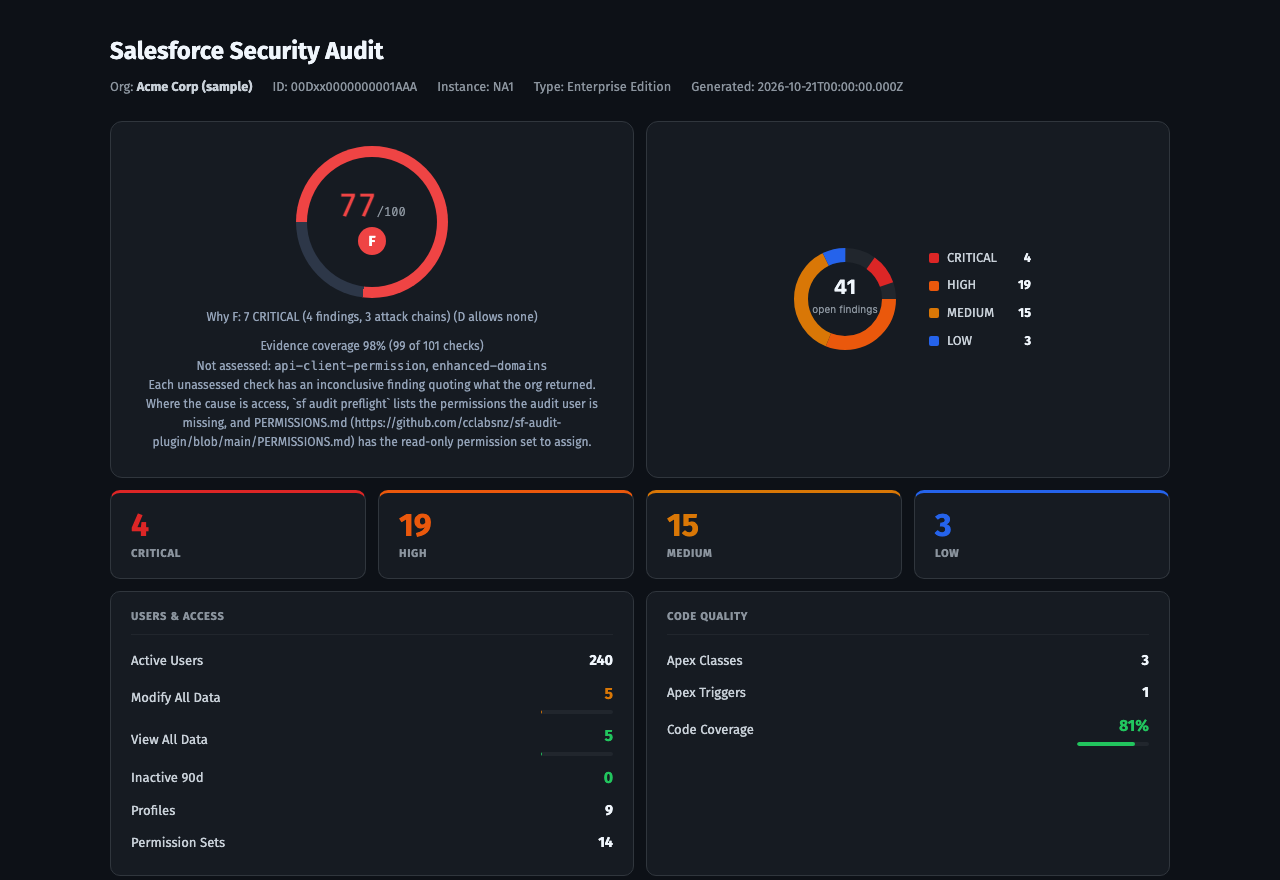
Acme has problems outside Experience Cloud too, such as too many admins, which is part of why it grades F. The guest configuration alone produces two CRITICAL findings (objects fully readable by unauthenticated guests, and guest-executable Apex that runs without sharing), and the report joins them into a CRITICAL attack chain, unauthenticated bulk exfiltration, because together they describe the March campaign: a guest foothold, a public external sharing model, and code that skips record access. The chain's remediation says the part people miss: tightening login controls does nothing here, because the requests never reach a login page.
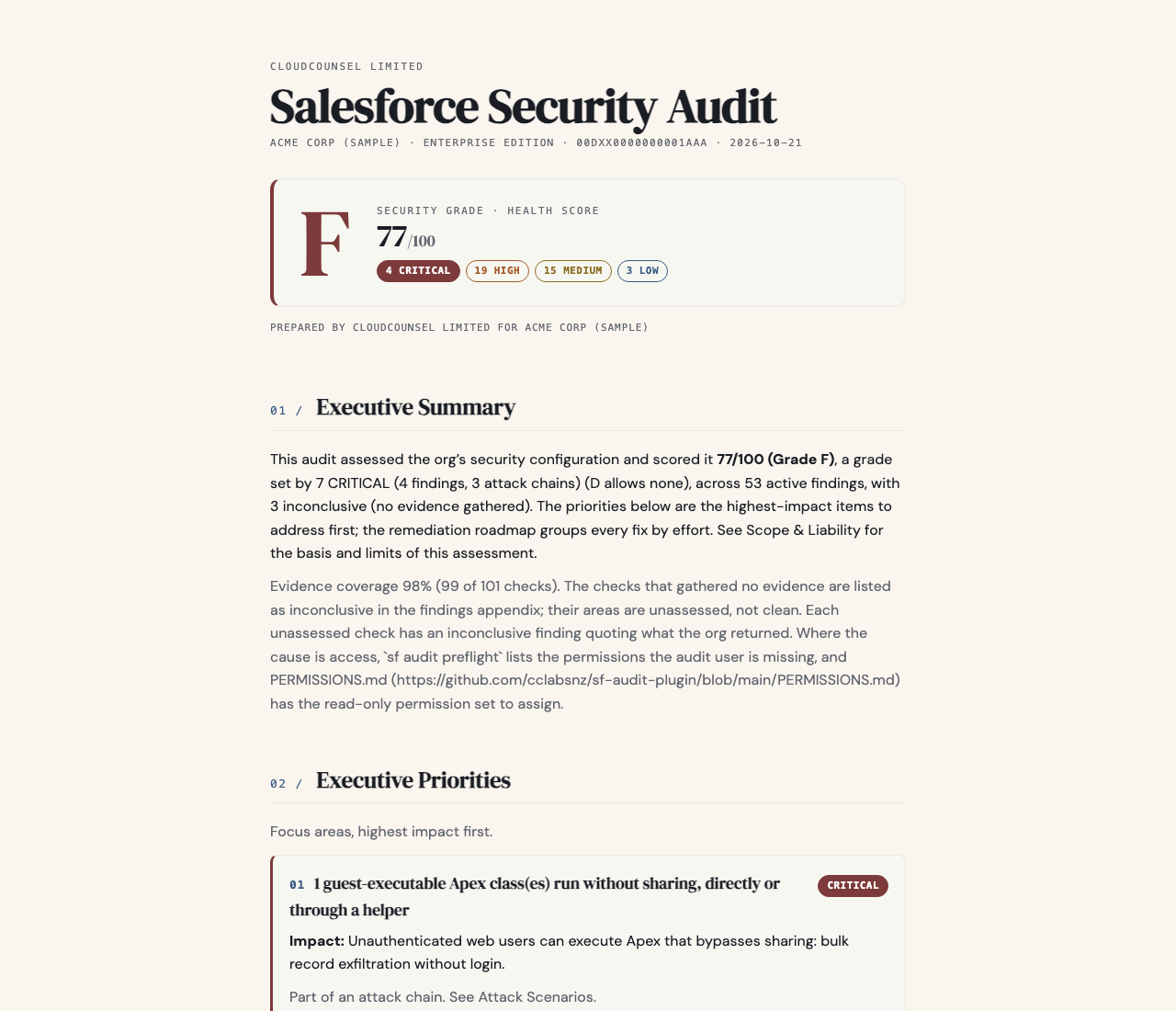
The executive report is the version for whoever signs off the risk. Open the full samples to click through every finding:
Making it stick
The review is only as good as its last run. Two ways to keep it current:
- Run it on a schedule. The sf-audit GitHub Action runs the same audit in CI and can fail the job on any HIGH or CRITICAL finding, so a new site with a cloned guest profile shows up the week it goes live.
- Keep the logs you get for free. Without Event Monitoring,
EventLogFilekeeps about a day of history.sf audit events pullsaves it to disk daily, so if a guest anomaly fires next month you have theAuraRequestrows to investigate it. The free Event Monitoring baseline post covers the setup, and investigating a Guest User Anomaly covers what to do when one fires.
Frequently Asked Questions
Q: Is "API Enabled" off on the guest profile enough to stop Aura scanning?
Not on its own. Salesforce pairs it with the site's "Allow guest users to access public APIs" setting and calls the pair the highest-impact single change, and that site setting is one of the items you have to check by hand. Even with both off, keep the guest with nothing to read: no object access it does not need, external defaults Private, and no without sharing Apex it can call. Those are what decide how much any route can return.
Q: We only have one site. Do we still need this?
Check that first: experience-cloud-site lists every live site with a guest user, and Classic Force.com Sites are covered by classic-sites. Most orgs that answer "one" find at least one more.
Q: Does running sf-audit against production change anything?
No. It only reads. The project's tests fail the build if a write API, an HTTP client or telemetry appears in the source, and its docs include a read-only permission set for the audit user.
Q: Why does the tool not check items 6 to 8?
Enhanced Personal Information Masking, Profile Filtering and the nickname settings are not read by the plugin today. They limit what a guest learns about your users rather than which records leave, so they are lower priority than items 1 to 5, but they are still on Salesforce's list and still worth the ten minutes by hand.
Key Takeaways
- Salesforce's checklist is the right list. Ticking it from memory is not the same as verifying it on every site.
- The data exposure comes from a combination: guest object access, a public external default, and code that skips sharing. Check all three together.
- Guest-callable
without sharingApex is the gap the checklist leaves out. - A handful of items still need a person. Put them on the review, and automate the rest so drift shows up the week it happens.
What's Next?
Run the audit against a sandbox refreshed from production, fix anything CRITICAL, then add it to CI. If you find an Experience Cloud guest exposure the plugin missed, open an issue on the sf-audit repository: the manual items above are the next candidates for checks.
Resources & References
- Protecting Your Data: Essential Actions to Secure Experience Cloud Guest User Access, Salesforce, 7 March 2026, updated 11 March 2026
- ShinyHunters claims new campaign targeting Salesforce Experience Cloud sites, Help Net Security, 11 March 2026
- Many Public Salesforce Sites are Leaking Private Data, KrebsOnSecurity, 27 April 2023
- The Salesforce Data Theft Campaigns, 2025 to 2026: A Verified Timeline
- sf-audit on npm and on GitHub
Responses
Checking your session.
Loading responses.